How to Send Offers Faster on High-Volume MLS Deals
Discover how to send offers faster by automating your contract process. Boost your efficiency and eliminate delays with proven strategies.
How to Send Offers Faster on High-Volume MLS Deals

The fastest way to send offers faster is to stop retyping contracts by hand. Automate a prefilled, state-approved purchase agreement, send it straight from your Gmail, and turn on open tracking so you know the second a listing agent looks at it. That single change removes the two biggest bottlenecks in a high-volume offer pipeline: drafting time and dead silence after you hit send.
If you’re already running 20 to 100+ offers a month through a virtual assistant and DocuSign, you already know the real cost isn’t the software. It’s the ten to fifteen minutes per offer, the wrong county pulled into a contract, and the agent who never opens your email because it looks like spam. SendMLS was built around that exact bottleneck, with a 7-day free trial and no setup required to test it against your current process.
Three things matter most before you touch any tool:
- Uniform intake, so every offer you send has the same structure an agent can scan in ten seconds.
- Net-proceeds scoring, so you and your team rank offers the way a seller actually thinks, not just by price.
- Automated, trackable delivery, so contracts go out prefilled and correct, and you know exactly when they’re read.
Key Takeaways
Sending offers faster requires uniform intake, automated state-approved contracts, Gmail-based sending, and open tracking working together as one system, not as separate fixes.
| Point | Details |
|---|---|
| Standardize intake first | Use one field order (price, financing, contingencies, earnest money, closing date) for every offer. |
| Automate the contract | Prefilled, state-approved templates cut drafting time from 15 minutes to under 2-3 minutes. |
| Track every open | Follow up the moment an agent views the offer instead of guessing when to call. |
| Pilot before scaling | Run 20 deals in parallel over 7 days and require attorney sign-off before full rollout. |
| Try SendMLS | A 7-day free trial with no setup lets you test prefilled contracts, Gmail send, and open tracking on real listings. |
Table of Contents
- Why Speed Changes Outcomes in High-Volume Offer Environments
- The Three Habits High-Volume Teams Run Every Time They Submit Offers
- How Automation Cuts Time Per Offer and What Features Actually Matter
- A 0 to 7 Day Pilot to Prove This Actually Works
- What to Do When an Agent Won’t Use Your System
- The KPIs That Prove Your Pilot Worked
- Compliance Guardrails Before You Automate Anything
- How SendMLS Maps to This Entire Workflow
- Your 24-Hour Action Plan
- Why I Think Most Teams Get This Backwards
- Try SendMLS: What It Does and How to Start the Trial
- Selected Reading and Tools to Learn More
- Sources
Why Speed Changes Outcomes in High-Volume Offer Environments
Speed isn’t a vanity metric here. It changes three numbers directly: acceptance rate, time-to-contract, and how many deals you lose to another buyer simply because you were slower to respond.
Listing agents managing multiple offers on aged inventory are triaging constantly. Agents running structured intake-and-broadcast workflows, where every buyer submits on the same format by the same deadline, report faster decision cycles and a higher share of non-contingent offers making it through. That’s not because buyers suddenly got better financing. It’s because the process itself rewards clarity and speed over ambiguity.
Three behaviors show up again and again on the agent and seller side when offers arrive fast and clean:
- Sellers read a quick, complete offer as a signal the buyer is organized and likely to close, not just cheap.
- Agents respond to counteroffers faster when the original submission didn’t require follow-up questions.
- Information lag drops. An agent who has to email you back for the closing date or proof of funds is an agent who moves your offer to the bottom of the pile while they wait.
Pro Tip: If your offer takes more than one email exchange before an agent can present it to their seller, you’ve already lost time you can’t get back on a competitive listing.
The Three Habits High-Volume Teams Run Every Time They Submit Offers
Before you automate anything, fix the habits. A fast tool wrapped around a messy process just produces messy offers faster.
Uniform intake. Every offer you send should carry the same fields in the same order: purchase price, financing type, proof of funds or preapproval, contingencies, earnest money amount, and proposed closing date. Agents managing multiple competing offers use exactly this structure to compare buyers without spreadsheets or guesswork. If your team sends offers in six different formats depending on who typed them, you’re forcing the agent to do the standardization work you should have done yourself.
Net-proceeds scoring. Price is only one input. Weight financing certainty, the number and type of contingencies, earnest money size, and closing date flexibility against what the seller actually nets after concessions and closing costs. A cash offer at 92% of list with a 14-day close often beats a financed offer at 97% with a 45-day close and an appraisal contingency. Score offers this way internally before you ever compare them against a competing buyer.
Single ranked comparison. When you’re evaluating multiple properties or your team is running parallel negotiations, build one page per deal that ranks the offer against your own criteria: net proceeds equivalent, certainty of close, and speed. This is the same discipline top agents use to present sellers with a clear ranked summary instead of a folder of PDFs.
A sample intake format you can hand any team member or VA:
- Property address and MLS number
- Offer price
- Financing type (cash, hard money, conventional)
- Proof of funds or preapproval attached (yes/no)
- Contingencies (inspection, financing, appraisal, none)
- Earnest money amount
- Proposed closing date
- Buyer entity name and contact
Pro Tip: Tell buyer agents up front what format and deadline you’re working with. Agents running broadcast-style submission processes already expect this from serious buyers, and it signals you’re not a tire-kicker sending fifty lowball letters.
How Automation Cuts Time Per Offer and What Features Actually Matter
Manual offer drafting has a hard ceiling. A person can only type contracts so fast, and every manual entry is a chance to put the wrong county, the wrong legal description, or the wrong closing date into a binding document.
The features that actually move the needle:
- Prefilled, state-approved contract templates pulled from property and county data
- One-click send from your own Gmail account, not a generic no-reply address
- Open tracking that tells you the moment an agent views the offer
- A standardized intake form your VAs or acquisition reps fill out the same way every time
- A dashboard for side-by-side comparison across dozens of active offers
- Integration with your CRM so submitted offers land in your pipeline automatically
Template-based automation for standardized real estate documents shows measurable gains elsewhere in the industry. AI-assisted drafting has cut purchase agreement drafting time from a 45 to 90 minute range down to 15 to 25 minutes in practice examples, with closing package prep dropping from three to four hours to under an hour.
| Method | Time per offer | Error risk |
|---|---|---|
| Manual drafting (VA or investor typing) | 15 minutes | High, especially on county and legal description fields |
| Template-assisted drafting | 15-25 minutes for full purchase agreement | Moderate, still requires manual data entry |
| Automated prefill with state-approved templates | Under 2 minutes to generate and send | Low, data pulled directly from property records |
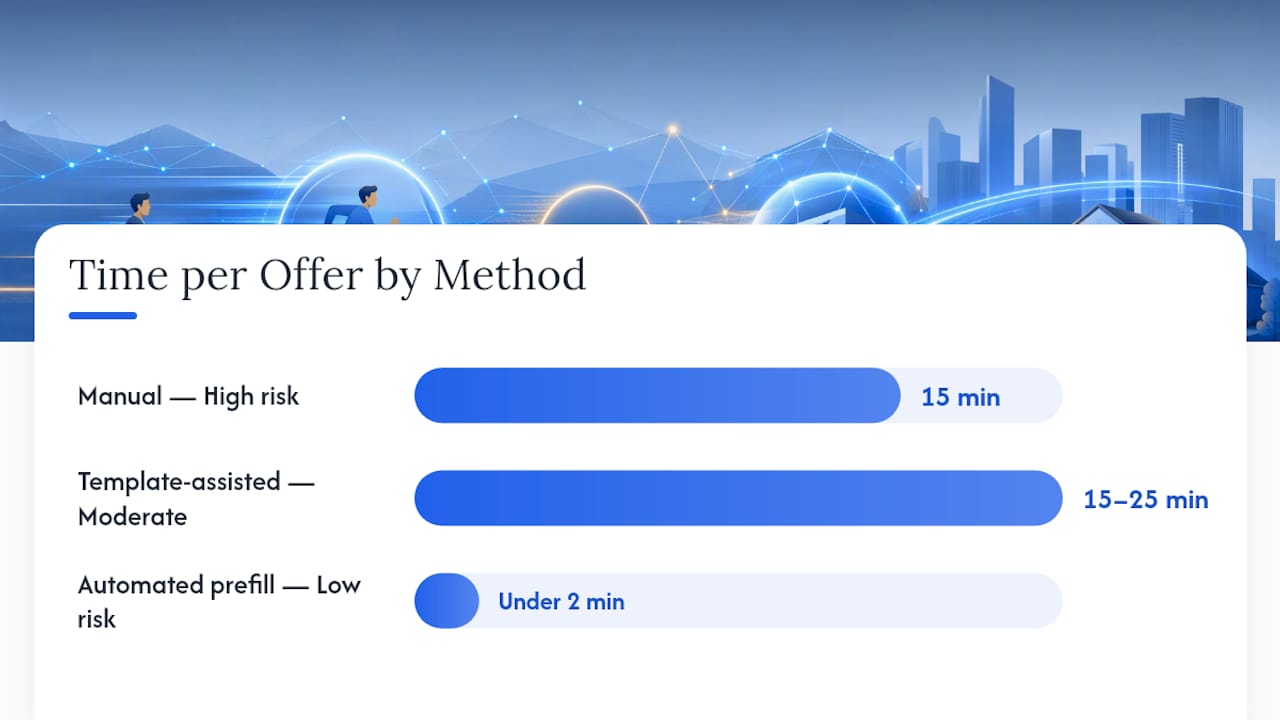
Open tracking changes the entire follow-up game. Instead of guessing whether an agent even saw your offer, you follow up the moment the read receipt fires. A follow-up call an hour after an agent opens your offer lands completely differently than a cold call three days later asking if they “had a chance to look at it.”
A 0 to 7 Day Pilot to Prove This Actually Works
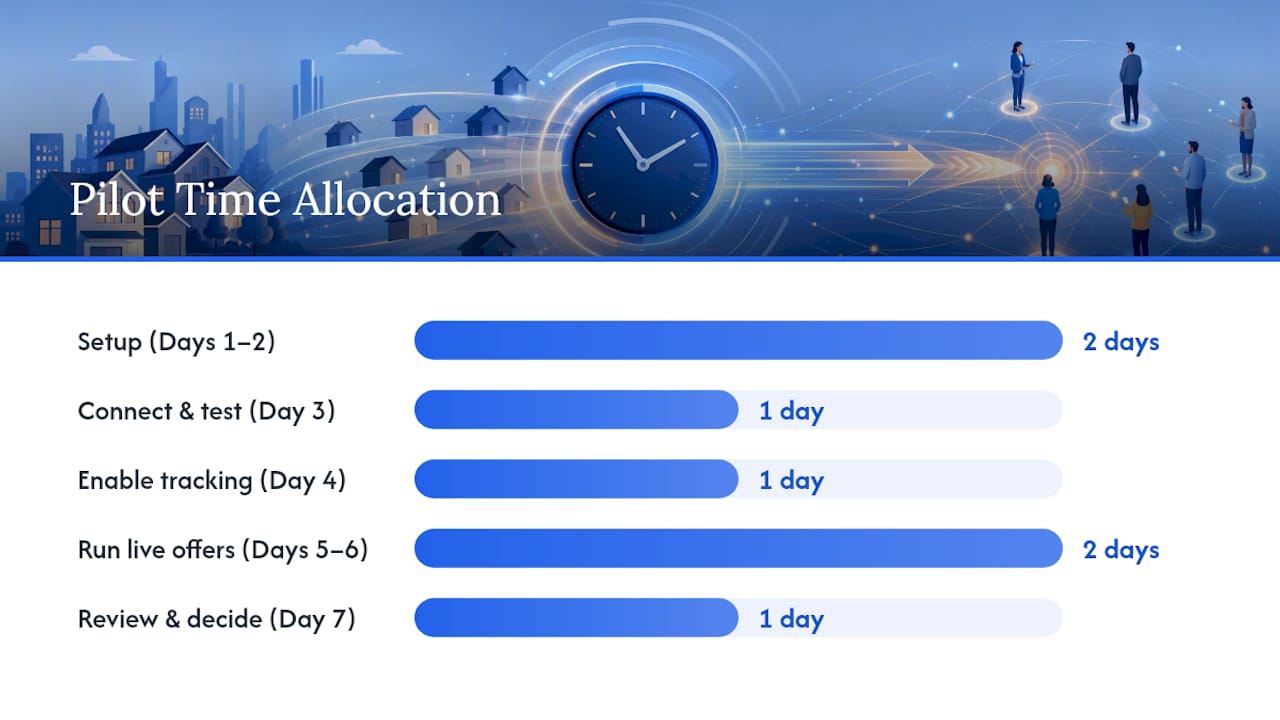
Run a real pilot before you roll this out across your whole team. Seven days is enough to see whether automated, tracked offers move faster than your current process.
- Day 1: Build your intake template using the uniform fields above and load your target list of 20 sample listings.
- Day 2: Configure your prefilled contract template for your primary operating state and confirm the fields pull correctly from county and MLS data.
- Day 3: Connect your Gmail account for sending and test one offer to an internal address to confirm formatting.
- Day 4: Enable open tracking and send a second internal test, checking that read notifications fire correctly.
- Day 5-6: Run live offers on your 20 sample listings in parallel, exactly as the pilot-then-scale approach recommends for AI-driven contract automation.
- Day 7: Review time per offer, error rate, and open-to-response time, then decide whether to expand to your full listing target.
Measure two things during the pilot: total time from “decide to offer” to “contract sent,” and how many offers needed a correction after the fact.
Pro Tip: Train a second team member on the full workflow during the pilot, not after. If your one automation expert goes on vacation during your busiest week, you need a backup who already knows where the attorney review checkpoints live.
Move from pilot to full rollout once your error rate on automated offers is lower than your manual baseline and your time per offer has dropped by at least half.
What to Do When an Agent Won’t Use Your System
Not every listing agent wants a portal link or a Gmail-sent contract. Some will only take a PDF attachment, and some will ignore anything that doesn’t come through their own transaction platform. Build for that reality instead of fighting it.
Send buyer agents a short broadcast message ahead of your deadline: “We’re submitting our offer on [address] by [date/time]. Happy to send via email or portal, whichever you prefer.” Broadcasting submission instructions this way, the same method top-producing listing agents use with buyer’s agents, sets expectations before confusion starts.
When an offer arrives outside your system as an emailed PDF:
- Time-stamp it the moment it lands, even if that means a manual note in your dashboard.
- Upload the PDF into your pipeline immediately so it sits alongside your tracked offers for comparison.
- Follow up directly for any missing fields (proof of funds, entity name) rather than assuming the agent will send them unprompted.
- Accept manual uploads as a normal part of the process. Forcing every agent into your format costs you deals with agents who simply refuse.
The KPIs That Prove Your Pilot Worked
Track five numbers, not fifty. These are the ones that tell you whether automation is actually working or just feels faster.
- Time per offer = total staff hours spent on offers ÷ number of offers submitted
- Offers submitted per day, tracked before and after automation
- Offer acceptance rate, the percentage of submitted offers that result in a signed contract
- Time-to-contract, from initial submission to executed agreement
- Error rate, the percentage of offers requiring a correction after submission
| KPI | Manual baseline | Target after automation |
|---|---|---|
| Time per offer | Several minutes | Significantly reduced |
| Error rate | Varies by team, often higher on county/legal fields | Reduced substantially with prefilled fields |
| Offers per day (per rep) | Moderate volume | Increased with automation |
A quick ROI example: if a VA costs $900 a month and processes 300 offers, that’s $3 per offer in labor alone before counting corrections and resends. Cut time per offer by two thirds and that same VA, or a much cheaper subscription, can handle three times the volume without adding headcount.
Compliance Guardrails Before You Automate Anything
Faster is only a win if it’s still compliant. Automation should reduce your legal exposure, not create new ways to send a bad contract at scale.
Non-negotiable guardrails:
- Only use state-approved contract templates, never a generic letter of intent dressed up as an offer.
- Maintain an audit trail for every offer sent, including timestamp, recipient, and open confirmation.
- Store sensitive buyer and property data securely, with access limited to people who actually need it.
- Require attorney sign-off before any automated template goes into production use.
An attorney review checklist worth adopting: a named reviewer checks the template against your state’s current approved form, confirms every merge field maps to the correct data source, and signs off with a timestamp before the template goes live. Firms working with AI-generated legal outputs increasingly formalize this exact sign-off step, documenting who reviewed what and when.
That documentation doubles as a trust signal. Show a broker or a skeptical listing agent your audit log and attorney sign-off confirmation, and “we’re just blasting offers” stops being a credible objection.
Pro Tip: Keep your attorney review checklist and audit trail in the same place you store your intake templates. If you ever need to show a broker your process is legitimate, you want that proof in one click, not scattered across three tools.
How SendMLS Maps to This Entire Workflow
Everything above describes a workflow. SendMLS is one way to run it without building your own stack from scratch.
SendMLS generates state-approved purchase contracts prefilled with property and county details, sends them directly from your Gmail so they land as real paperwork from a real person, and tracks opens so you know the moment an agent views your offer instead of guessing. A dashboard organizes every submitted offer in one pipeline, which solves the exact side-by-side comparison problem covered above.
For a team running 20 to 100+ offers a month, the practical result is fewer wrong-county contracts, no more waiting three days to find out an agent never opened your email, and a single place to see every offer’s status instead of digging through a shared inbox.
The trial runs 7 days with no setup required, so you can pilot exactly the process described in this article on real listings before committing to anything.
Your 24-Hour Action Plan
You don’t need a full week to start. Here’s what you can do before tomorrow:
- High effort, high priority: Pick your uniform intake template and lock the field order (financing, contingencies, earnest money, closing date).
- Low effort, high priority: Connect your Gmail account to whatever sending tool you choose and confirm outbound formatting.
- Low effort, high priority: Turn on open tracking if it’s available, even before you’ve automated contract generation.
- Medium effort: Run five internal test sends to confirm everything renders correctly before it touches a real listing agent.
- High effort, ongoing: Assign one person, not a rotating cast of VAs, to own the pilot and report on time-per-offer weekly.
Whoever owns this should be the person most annoyed by your current process. That’s usually who fixes it fastest.
Why I Think Most Teams Get This Backwards
Most investors chase the automation before they fix the habit. They’ll buy software to send contracts faster while still deciding offer strategy by gut feel and comparing competing deals in three open browser tabs. That order is backwards. The uniform intake format and net-proceeds scoring have to exist first, because automating a bad process just produces bad decisions at higher volume.
There’s also a reputational risk nobody talks about enough. Forum discussions among investors already show pushback against bulk, indiscriminate offer strategies that ignore fair regional pricing and agent relationships. Speed without judgment just gets you flagged as noise. The teams that win long-term combine fast, clean, compliant offers with actual respect for the agent’s time on the other end. That’s the whole reason SendMLS builds prefilled, state-approved contracts instead of generic templates. An offer that looks like real paperwork gets treated like a real offer.
Try SendMLS: What It Does and How to Start the Trial
SendMLS is the alternative to paying a VA $900 a month to hand-type contracts, or to burning your own evenings retyping the same purchase agreement for the fifteenth time this week. It generates state-approved contracts prefilled from property and county data, sends them from your actual Gmail account, and tracks opens so you follow up when it counts instead of when you happen to remember.
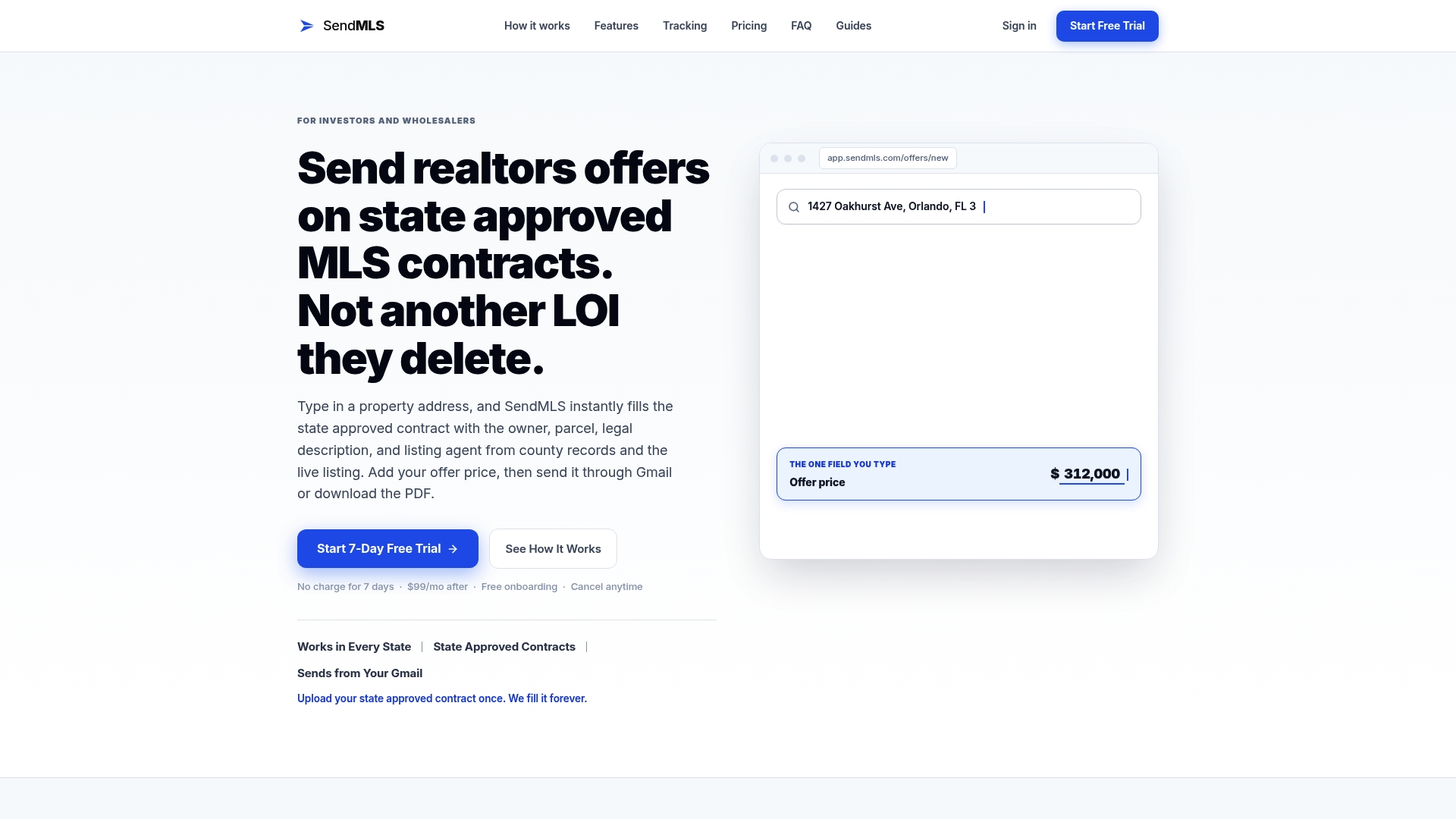
Everything covered in this article, from uniform intake to a dashboard for side-by-side comparison, is already built into the platform. You get:
- Faster throughput without adding a second VA
- Fewer errors on county, legal description, and closing date fields
- A documented audit trail for every offer, useful for attorney review and broker conversations
The trial runs 7 days, requires no setup, and lets you run your own version of the pilot described above on real listings. If you’re serious about running 20, 50, or 100+ offers a month, start your SendMLS trial today and see how fast your pipeline actually moves.
Selected Reading and Tools to Learn More
- How I Organize and Present Multiple Offers Without Chaos — the field-tested intake and ranking system behind the uniform intake habit.
- Control the Offer Process: How High Volume Agents Spend Less Time in Escrow — shows how broadcast deadlines and instant notifications speed up decisions.
- Automating wholesale contract generation with AI — the 20-deal pilot and attorney review approach this article’s pilot plan is built on.
- AI contract drafting for real estate — use cases — real time-savings figures for automated drafting versus manual work.
- Automated offers on MLS? — BiggerPockets forum — investor perspectives on the limits of pure volume without judgment.
- Reviewing AI output: how plaintiff firms ensure accuracy and uphold ethics — the attorney sign-off protocol referenced in the compliance section.
- Why Listing Agents Ignore Your Offers (And How to Fix It) — background on the agent-side reasons offers stall.
- What is a neighborhood comps analysis — useful context for pricing offers accurately when speed matters most.
Sources
- How I Organize and Present Multiple Offers Without Chaos
- Automating wholesale contract generation with AI
- AI contract drafting for real estate — use cases
- Reviewing AI output: how plaintiff firms ensure accuracy and uphold ethics — Eve Legal